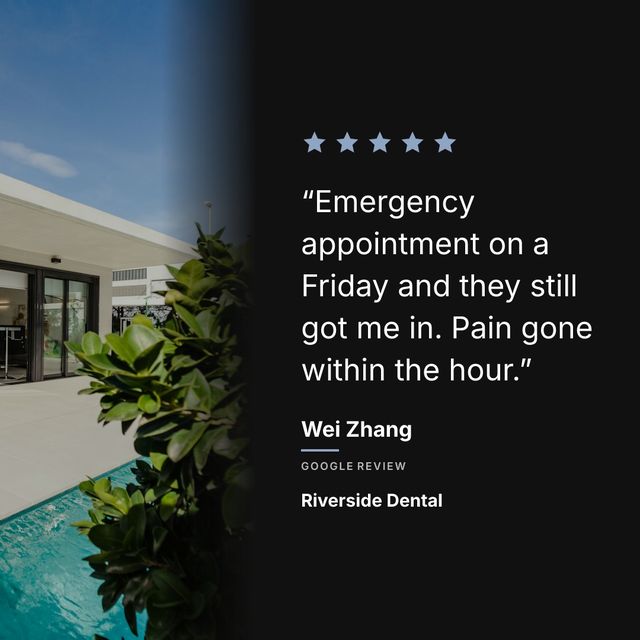
You have three options. Screenshot the review, which takes seconds and looks like a screenshot. Rebuild it in Canva, which looks good and takes about fifteen minutes per post. Or use a tool that pulls the review from Google and generates the graphic for you, which looks good and takes about ten seconds.
You have a Google review that says something genuinely nice about your business, and you want it on Instagram. Here is what each option actually costs you in time and how the result looks.
The three options, compared:
- Screenshot: free, instant, looks unprofessional
- Canva template: free, 10 to 20 minutes per post, looks good
- A review-to-post tool like Prizz: free for 3 posts a month, about 10 seconds per post, looks good
Most people screenshot their Google review page and post the screenshot. It works, technically. But it looks terrible. The text is tiny, the interface chrome takes up half the image, and your Instagram feed starts to look like a collection of phone screenshots. Not great for a business that wants to look professional.
The second option is opening Canva, creating a 1080x1080 square, picking a background, typing out the review, adding stars, choosing fonts, adjusting spacing, exporting the image, and then posting it. This takes 10 to 20 minutes per review. If you post one review a week, that’s over an hour a month spent making graphics for content your customers already wrote for you.
The third option is using a tool that does this automatically.
The manual Canva method
Here is what the Canva workflow looks like in practice:
Open Canva. Pick “Instagram Post” as the size. Choose a template or start from scratch. Type out the review text. Add the reviewer’s first name. Add a star rating graphic. Drop in your logo. Pick colors that match your brand. Adjust the font size so the text fits. Export as PNG. Open Instagram. Upload the image. Write a caption. Post.
You do this every single time you want to share a review. And if you want your posts to look consistent (same layout, same fonts, same colors), you need to remember all those settings or save a template and duplicate it each time.
It is not hard work. But it is repetitive, and repetitive work is the kind of work that stops getting done after a few weeks. You start with good intentions, posting a review every week. By month two, you have not posted one in three weeks because you did not feel like opening Canva.
What an automated tool does differently
A tool like Prizz works like this: you paste your Google Maps link once. The tool pulls in your recent reviews, and you can load older ones whenever you want. You pick a review you like, choose your brand colors and a background photo, and the tool generates a ready-to-post Instagram graphic. You tap share, and it goes to Instagram with a pre-written caption.
The first time takes about two minutes because you set your brand colors and upload your logo. Every review after that takes about 15 seconds. Pick the review, tap share, done.
The bigger difference is what happens when a new review lands. The tool checks your listing on a schedule — twice a day on the paid plan, daily on the free one — and sends you a notification: “New 5-star review from Sarah.” You tap the notification, see the graphic already made, tap share. The entire workflow from notification to posted takes less time than unlocking your phone and opening Canva.
Does it actually matter?
If you are a business that gets two reviews a month, this probably is not worth thinking about. Screenshot it and move on.
But if you get reviews regularly and you believe your Instagram presence matters to your business, the math changes. A restaurant that gets five reviews a week could post review content consistently without spending any time on it. A salon that shares every positive review builds a feed that works as social proof for anyone checking out their page before booking.
The businesses that do this well stand out. The ones who start and then stop (because it is tedious) look worse than if they had never started.
What to look for in a tool
If you decide to use a tool for this, here is what matters:
It should pull reviews from your Google Business Profile automatically. You should not have to copy and paste review text manually.
It should let you customize the look. Your brand colors, your logo, your fonts. The output should look like your business made it, not like a generic template.
It should generate the caption for you. Stars, review text, author name, and relevant hashtags. You should be able to edit it before posting, but you should not have to write it from scratch.
It should not require a design degree to operate. If you need to watch a tutorial to figure it out, it is too complicated for this job.
Prizz does all of this. Free for your first 3 posts per month, $15/month for unlimited posts. But whatever tool you use, the point is the same: your customers are writing your marketing for you. Use it.